Monday, October 28, 2013

Students, to launch Mavis Beacon Typing, click on MB logo on your desktop. 


Introduction to "Mavis Beacon Typing" click on the page.
 The Sign in Page appears; Select "new", type your last name
and class number.
 Select Take a Lesson.
Select Speed Test, then select the Beginner Speed Test.
The beginner speed test lesson contains 100 common words. 
The maximum lesson time is unlimited, 
with a target speed of 25 words per minute(WPM), 
and the maximum errors allowed is 225. Typing errors appear in red text as you type.
• click Start to begin speed test.
• select pause to end lesson, you have an option to resume or end the lesson.
• To end the typing lesson select the Home tab > Exit > yes or no.

STUDENTS READ AND FOLLOW DIRECTIONS
YOU WILL BE GRADED ON YOUR PROGRESS.

•  Launch Mavis Beacon Typing
•  Sign in; select your name and click OK.

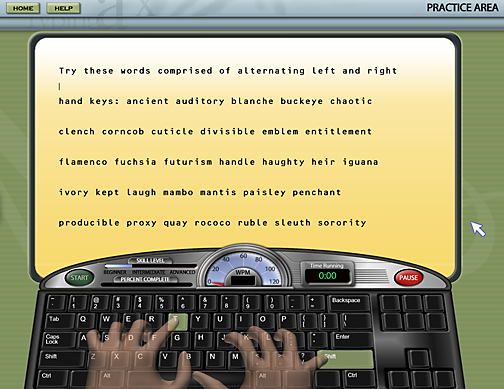
•  Select Practice Area

•  Scroll down and select Keyboarding Drills 
 •  Select Alternating Hands

•  Select Alternating Hands 1.    Click Start


  Work toward completing alternating hands 1 through 4

SHUTTING DOWN PROCESS
• At the end of the period select the HOME tab in the upper left hand corner.
 •   Select Exit
•   Select Yes

NOTE:    1.    PLEASE BRING A SET OF EAR PHONES TO USE WITH MAVIS BEACON TYPING.
2.   BRING IN YOUR FLASH DRIVE.

Thursday, August 29, 2013

Welcome Back!


Welcome to Andries Hudde Jr. High School. My name is Mr. King; I will be your computer teacher. In order to make this year a successful and enjoyable one, it is essential that you review the following guidelines and requirements with your parents.


Guidelines for a Successful Year:
  1. Respect each other, school property, and the teacher at all times.
  2. Come to class on time prepared to learn every day.
  3. Bring a notebook and a pencil to class every day.
  4. Do not bring food, chewing gum, or drinks into the computer lab or classroom.
  5. Students are not allowed to listen to music during computer class, their computer will be turned off, and they will receive a grade of zero for that period.
  6. Be in your seat with your notebook opened by the time the late bell rings.
  7. No phones are allowed in the computer lab or classroom; no calls, and no texting. The phone will be removed by the teacher, and the parent will have to pick up the phone from the main office.

  1. If you do not understand something, or if you are having problems with your schoolwork, please let us know so we can help.
  2. Please obtain the number of at least two other students to call when you are absent. You are responsible for all of your assignments.
  3. “Students and Parents” refer to www.huddetech.blogspot.com for assignments and to www.huddetech.weebly.com the computer technology website. Work hard and you will have a successful year.
 Required Supplies:

  1. A spiral colored notebook for computer class.
  2. At least two #2 sharpened pencils, and a sharpener.
  3. Two pocket folders.
  4. A 4 gigabit flash drive.
  5. Erasable (blue or Black) ink pens.
  6. Additional supplies may be required at a later date.

Grading Policy will be comprised of:
  • Projects, Test and quizzes:        60%              
  • Homework:                                20%                        
  • Notebook:                                 10%                           
  • Class work & Participation:      10%

If you have any questions, please feel free to send a note with your child or contact Mr. King at:   Andries Hudde phone: (718-253-3700) Ext.3322  email: wking4@schools.nyc.gov 
The above information is available on line at:  www.huddetech.weebly.com  and at www.huddetech.blogspot.com.  
           
NOTE: Please ignore the post below.